MemGym — FAQ, Troubleshooting & Privacy
General questions
Is this another flashcard app?
No. The surface looks similar — cards, a feed, a practice loop — but the thing being measured is different. Flashcard apps (Anki, Quizlet, Remnote) optimise recall: did you remember the fact or not? MemGym optimises calibration: how far off was your confidence prediction from your actual performance?
Every card forces you to log a confidence estimate before you reveal or attempt — 1 (low), 3 (medium), 5 (high). After you perform, you score what actually happened. The gap between the two is the number MemGym tracks. A flashcard app can't surface that gap because the prediction step doesn't exist in the protocol.
If you want to drill trivia, vocabulary, or medical mnemonics, Anki will serve you better. MemGym is for people who want to know where their confidence is lying to them — across recall, behaviour, and planned responses.
How is it different from Anki / Quizlet?
Anki and Quizlet are recall optimisers: they surface cards according to whether you got them right, and the goal is to push material into long-term memory. MemGym is a calibration optimiser: it measures prediction accuracy, not just recall.
Three structural differences:
- The prediction step is mandatory. You cannot skip to the reveal. The confidence number you log before the reveal is the entire point — it feeds the calibration graph.
- Card types go beyond recall. MemGym has five card types: Q&A (recall), assertion (a specific behaviour you want to embody — grounded in cognitive-behavioural enhancement, not therapy), if-then (an implementation intention: a cue-to-action plan you rehearse in advance), scenario (jot your move, then compare to a strong response), and reflection (write an honest answer about yourself, then reveal the prompt's intent). You cannot create the non-recall types in Anki in any meaningful way because there is no protocol for scoring a behavioural rehearsal.
- You author from your own life. There are no public decks to import. The card is something that actually matters to you in a specific context — a board meeting, a sales call, a hard conversation. The specificity is load-bearing.
How is it different from affirmation apps (ThinkUp, etc.)?
Affirmation apps ask you to listen to or repeat positive statements and trust that repeated exposure produces change. There is no prediction, no test, no gap measurement, and therefore no way for the app — or you — to know whether anything shifted.
MemGym's assertion cards look similar on the surface: "I stay calm and curious when challenged." The difference is the protocol. You predict how true that feels right now, you rehearse the behaviour, and then you score what actually happened. The calibration graph shows whether your predictions about your own behaviour improve over time.
Effect-size context, honestly: the evidence for the mechanisms MemGym uses is real but modest. Implementation intentions (if-then plans) show roughly d≈0.65 for goal attainment in the research literature. Self-affirmation effects converge around d≈0.41. Self-talk d≈0.48. These are small-to-medium effects. They compound with specificity, spacing, and a closed feedback loop — which is the bet MemGym is making — but no study has tested this exact assembled system. The components are evidenced; the integrated product is not yet validated at scale.
What we do not claim: that any single card will transform your behaviour, that these are large effects, or that you are broken and need fixing.
Do I need to import decks or download content packs?
No. There are no public decks and no content packs. The whole premise is that you author cards from your own work and life — from a meeting debrief, a pattern you noticed, a commitment you want to wire in, something you need to recall reliably.
Go to /new and write one card. The context field ("board-meeting", "sales-call", "deep-work") is how the app groups and will eventually surface cards at the right moment. The science note field is optional — but if you're writing an if-then card because you read something about implementation intentions, noting "implementation intentions d≈0.65 (Gollwitzer 2006)" keeps you honest about why the card exists.
Feed or Reel — which do I use?
Both run the exact same loop; they differ only in how cards are presented, and you pick in /settings (or from the toggle in the feed header).
Feed is the default — a scrollable list of every due card, in due order. Good for skimming what is queued and moving at your own pace.
Reel shows one card at a time, full-screen, like a pager. You advance with the on-screen arrows, the up/down arrow keys (j/k also work), a swipe, or the mouse wheel; after you score a card it auto-advances to the next. Good for a focused, one-thing-at-a-time session, especially on a phone.
There is no "right" choice — the predict-then-test contract is identical either way. Try both and keep whichever keeps you honest.
What's thumbs scoring?
It's an alternative to the explicit Missed / Partial / Nailed buttons, toggled in /settings. Instead of words, you tap a thumb: 👍 / 👈 / 👎 — 👍 = high/nailed, 👈 = medium/partial, 👎 = low/missed. The same three thumbs are used for the prediction and the outcome, so the gap between them stays comparable.
One thing to be clear about: the thumb rates the calibration gap, not recall. In Anki, the thumb tells the algorithm how well you remembered. In MemGym the thumb is on the gap, not the fact — it is just a faster way to log the same predict-then-test signal. Predict first, always; the thumb after the reveal scores how the actual outcome compared.
Your data
Where is my data stored?
It depends on how your instance is configured. MemGym runs in one of two modes, and the same app supports both:
Local-first mode (the default — no account, no backend). Your deck is stored locally in your browser's localStorage, under the key memgym.deck.v1. It never leaves your device. There is no account, no server sync, no analytics payload.
Practical implications of local-first mode:
- Clearing your browser data or cache clears your deck.
- Each browser and each device has its own deck. A card authored on your laptop is not on your phone.
- Incognito/private browsing sessions do not persist between sessions.
Backed mode (when configured with Supabase). When the instance is provisioned with a Supabase backend, MemGym backs your deck with Postgres instead. You sign in with a magic link sent to your email (no password), and your cards, predictions, outcomes, and review history persist server-side and sync across your devices. Every row is scoped to your account by row-level security (RLS) — no other user can read or write your data. In this mode, clearing a browser does not lose your deck, and a card authored on your laptop shows up on your phone after you sign in.
Local-first is the zero-backend fallback: it is what runs when no Supabase env vars are set. Backed mode is the opt-in path to cross-device persistence and accounts.
Do I need an account?
No — local-first mode needs no account at all. Open the app and practise; your deck lives in this browser. That is the default, and for a single-device user who exports the occasional backup, it is enough.
You'd sign in for one reason: the same deck and the same calibration history on more than one device. When the instance is configured with a backend, go to /login, enter your email, and open the magic link it sends — no password. After that, your cards and history persist server-side and sync across devices, scoped to your account so only you can see them.
So: account = cross-device sync. No account = fully local, nothing leaves your device. Signing in is an explicit opt-in, not a gate in front of the app.
If the magic-link email doesn't arrive right away, wait a few minutes before requesting another.
How do I back up my deck?

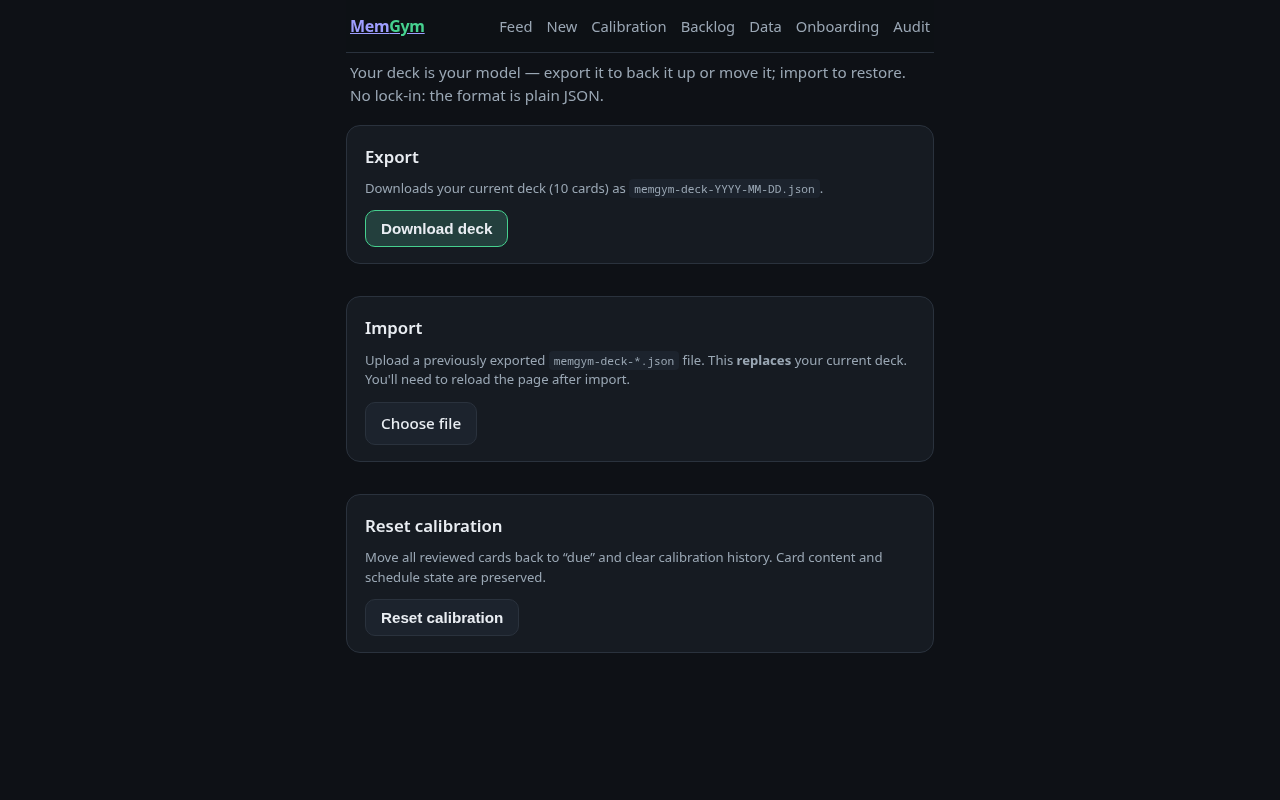
Go to /data and click "Download deck." This downloads a file named memgym-deck-YYYY-MM-DD.json containing your entire deck in plain JSON.
Do this regularly. There is no automatic backup. If you clear browser storage, there is no recovery path other than a previously exported file.

How do I move my deck to another device or browser?
- On the source device/browser:
/data→ "Download deck." Save the.jsonfile. - On the target device/browser:
/data→ "Choose file" → select the.jsonfile. - After import succeeds, reload the page (the import note tells you to do this — you must actually do it; the store picks up the new deck on page load, not mid-session).
The import replaces the existing deck on the target. If you have cards on the target that you want to keep, export that deck first, merge the JSON arrays manually, then import the merged file.
What is the format?
Plain JSON array of card objects. Each card has at minimum: id, type (qa / assertion / if-then), status (due / reviewed / backlog), prompt, and a calibration array of timestamped predict/outcome pairs. The format is designed to be readable and editable in a text editor without any special tooling.
Can I edit cards outside the app?
Yes. Export your deck, edit the JSON, import it back. You can also write cards in bulk this way if you have an existing set of statements or questions. The required fields for each card are: id (any unique string), type, status, prompt, and calibration (can be an empty array [] for new cards). The import will reject cards missing any of these.
Can I import from Anki / Excel / CSV?
Yes — /data imports these formats:
- JSON — the full round-trip format. Importing JSON replaces your whole deck.
- CSV and Excel (.xlsx) — convenient for bulk authoring in a spreadsheet. These add cards to your existing deck.
- Anki
.txt— export from Anki via File → Export → Notes in Plain Text (.txt) and import that.txt. This adds the cards to your deck. - Anki
.apkg— the full deck package, with cloze deletions, subdecks, and tags. Available in account mode (the parser runs on the server). Export from Anki as an Anki Deck Package with "Support older Anki versions" ticked, then import it at/data. Imported decks land in your backlog as a Classic-style collection — see the Importing from Anki guide.
Export works for JSON, CSV, and Excel (.xlsx).
A caveat worth stating plainly: imported decks are someone else's material. MemGym's whole premise is cards authored from your own life, so import is a portability convenience, not the intended path — see the card-authoring guide. Translating one card you imported into your own specific context beats practising a hundred you didn't write.
(In backed/account mode, JSON import isn't wired up yet — it's local-first only for now.)
Privacy posture
In local-first mode the app collects nothing. No analytics, no error tracking, no account data, no server requests from the app itself. Your cards, your predictions, your outcomes, your calibration history — all of it lives in your browser's localStorage and never leaves your device.
In backed mode (Supabase configured), the data you would otherwise hold locally — your deck, reviews, and calibration history — is stored server-side in Postgres, plus the auth identity (your email) that the magic-link sign-in needs. It is isolated per account by row-level security: the database enforces that you can only read and write your own rows. Signing in is the explicit opt-in to putting data on a server; until an instance is configured for it, the app stays fully local. Either way, the export/import path at /data remains as a local-only portability route.
Practice
How often should I practise?
Daily, in short sessions. The spacing model (SM-2-lite) is designed for short, regular exposure — not long cramming sessions. Ten minutes daily produces better calibration data than an hour on Sunday.
The more useful question is: have you practised every card at least once? Until a card has a calibration entry, the gap between predicted and actual is unknown. Get cards through the predict-then-test loop before worrying about optimising the schedule.
What is a good calibration score?
Calibration error is the average absolute gap between your predicted confidence (1/3/5) and your actual outcome (1/3/5), expressed as a percentage of the scale. Zero would mean your predictions are always exactly right. That is not realistic and not the goal.
Rough benchmarks:
- Below 20%: Well-calibrated. Your predictions are tracking reality closely.
- 20–40%: Normal for early use. Some overconfidence or underconfidence worth looking at.
- Above 40%: Significant gap. Worth checking whether a specific context is driving it (the calibration page breaks it down by context).
The number matters less than the trend. Is it improving over weeks? Are there specific contexts — a particular type of meeting, a specific behavioural card — where your error is consistently higher? That is the actionable information.
I'm always overconfident — what do I do?
First: this is normal, and it is the most common finding in calibration research. Overconfidence (predicting 5, scoring 3 or lower) is the default, especially in domains where you have expertise. The Dunning-Kruger pattern is real and your calibration data is catching it.
Practical steps:
- Slow the prediction down. The tendency is to scan the card and immediately reach for 5. Before you tap, ask: "Have I actually done this under pressure in the last two weeks?" Recency matters more than general familiarity.
- Re-read the actual context. If the card has a context tag ("board-meeting"), only count experiences in that context, not in general.
- For if-then cards specifically: a plan only earns a high confidence score if you have run the plan when the cue appeared. Not if you remember the plan — if you ran it.
- Use the calibration page. The "Where it's worst" breakdown shows which contexts are driving your overconfidence. Focus new card authoring there — more granular if-then plans for those specific cues.
- Don't try to fix the number. The goal is not to predict low so your error shrinks. The goal is accurate self-assessment. If the card is genuinely hard and you consistently score 2 when you predict 5, the card may need to be rewritten with more specificity, or you need more deliberate reps of the behaviour before it's worth rehearsing.
What card type should I use for a behaviour I want to build?
If-then for new habits or planned responses: "If I am in a board meeting and someone challenges my numbers, then I pause for two seconds before responding." These are implementation intentions — the research basis is fairly solid (roughly d≈0.65 for goal attainment) and the mechanism is specificity: a concrete cue linked to a concrete action.
Assertion for existing values or stances you want to keep active: "I stay curious rather than defensive when challenged." These work best as rehearsal prompts, not just affirmations — you read them, decide whether to act on them, and then score how it actually played out.
Q&A for things you need to recall reliably: facts, frameworks, names, process steps.
The if-then type tends to show the largest calibration gaps early on — it is very easy to feel like a plan is wired in before it has actually been executed under pressure.
Where are my per-card stats?
The /calibration page is your deck-wide view. For a single card, open its own page: in the feed, tap ⓘ details on the card, then open full page → (this goes to /card/<id>).
That page shows the calibration story for that one card — predicted vs delivered across its reps, whether the gap is closing, and when it is next due. It is a per-card slice of /calibration, not a recall grade. You can also reflect (spawning a new card), retire a mastered card, or delete one you authored from here.
Some AI-assisted actions appear on that page but are labelled and inert — they are forthcoming, not live yet.
Troubleshooting
Nothing is showing up in my feed
The most likely cause: all your cards have been practised and are now in "reviewed" status, and their next scheduled date has not arrived yet.
Check: go to /backlog. If you have cards there, promote one to the feed. If your calibration tab shows recent entries, your cards are spacing out — this is the intended behaviour, not a bug.
Options:
- Author a new card at
/new. - Promote a card from
/backlog. - Click "reset & practise again" (bottom of the feed page, or
/data→ "Reset calibration") to move all reviewed cards back to due and start a fresh pass. Note: reset clears calibration history.
I want to practise again — how do I reset?
Two ways:
- Feed page, bottom: click "reset & practise again."
/data→ "Reset calibration" button. This does the same thing and asks for confirmation.
What the reset does: moves all cards with status "reviewed" back to "due" and clears their calibration history. Card content, scheduling metadata, and backlog status are preserved. Cards currently in backlog stay in backlog.
I imported my deck but the feed looks wrong / cards didn't change
After import, you must reload the page. The import writes directly to localStorage but the running app has already loaded the old deck into memory. The store picks up the new data on next load.
Steps: /data → import → see "Imported N cards" confirmation → click "Go to feed →" (which triggers a reload) or manually refresh the browser.
If the count on the confirmation is wrong, or shows 0, the import file may have a validation error. The importer checks that each card has id, prompt, type (qa/assertion/if-then), and status (due/reviewed/backlog). Open the JSON in a text editor and check for missing fields or typos in the type/status strings.
Cards I authored aren't resurfacing after I practise them
This is the SM-2 spacing schedule working as intended. After you complete a card, it moves to "reviewed" and gets a next-due date based on your outcome score. A score of 5 (Nailed) schedules the card further out than a score of 1 (Missed) or 3 (Partial).
To check when a card is next due: the deck export at /data includes each card's schedule.dueDate field in ISO format — you can read it directly in the JSON.
If a specific card seems to have disappeared entirely: check the export. If the card is there with status: "reviewed" and a future dueDate, it will resurface when that date arrives. If the card is not in the export at all, it may have been deleted (the delete button on each card in the feed is permanent).
Can I lose my cards?
In local-first mode, yes. The deck lives in browser localStorage. You can lose cards by:
- Clearing browser storage/cache.
- Uninstalling the browser.
- Using a different browser or device (each has its own localStorage).
- The browser's storage manager evicting low-priority data (rare but possible on mobile).
Export regularly. /data → "Download deck" takes about two seconds. Keep the .json files in a folder you back up. In local-first mode there is no server-side copy, and there is no recovery path if you have not exported.
In backed mode (signed in, Supabase configured), your deck is persisted server-side in Postgres and survives clearing a browser or switching devices — sign back in and it is there. Export still works and is still worth doing as an offline backup.
The import shows an error about card validation
The importer requires four fields on every card object:
id— any stringprompt— any stringtype— must be exactly one of:qa,assertion,if-thenstatus— must be exactly one of:due,reviewed,backlog
Common mistakes when editing JSON manually:
"if_then"instead of"if-then"(hyphen, not underscore)- Missing the
calibrationfield entirely — this field is required and must be an array (use[]for a new card with no history) - JSON syntax errors (trailing commas, unquoted keys) — use a JSON validator before importing
The page is slow to load or the feed is blank
If the feed is blank briefly, wait a moment — "Loading your deck..." means the store is hydrating from localStorage. This usually takes under a second.
If the feed stays blank with no message: open browser devtools, check the console for errors. A common cause is a malformed localStorage value from a failed import or manual edit. To recover: export if possible, then clear the memgym.deck.v1 key from localStorage (devtools → Application → Local Storage), reload, and import your backup.